

The MRTV VR Machine
 Valve’s Steam Machine is a cool device that for sure bring lots of Steam libraries to many living rooms worldwide. But it simply is not a VR machine. For sure, you will have a blast streaming Half-Life: Alyx and many other classics to a Quest 3 or a Steam Frame.
But…once you want to upgrade to more serious high-end headsets in order to fully enjoy flight or race simming at its best, the device is underpowered and overpriced.
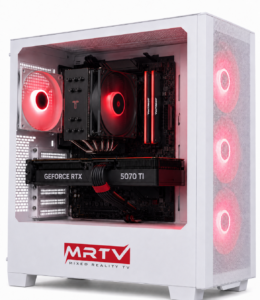
Therefore, meet the MRTV VR Machine! This is a PC build for $2000 that will give you the best VR bang for your buck! It is the “sensible” choice, meaning that every component has been chosen to be performant enough for high-end VR simming while not breaking the bank.
GPU: NVIDIA GeForce RTX 5070ti
The Bang For Buck GPU
For the graphics card, we chose the RTX 5070 Ti because it hits the sweet spot for this around $2,000 high-end VR build. It gives us strong modern Nvidia performance, 16GB of VRAM, DLSS support, DisplayPort connectivity and enough headroom for demanding PCVR titles. For high-resolution headsets like the Pimax Dream Air, the GPU is one of the most important parts of the whole system, so this is where spending more makes the biggest difference.
We considered the regular RTX 5070, but for this kind of VR build it felt like the wrong place to save money. The RTX 5070 is still a good card, but its 12GB of VRAM gives it less long-term headroom, especially for demanding sims like Microsoft Flight Simulator 2024. The RTX 5070 Ti costs more, but for serious high-end VR it is the more balanced and future-proof choice.

CPU: AMD Ryzen 7 9800X3D
Flight Simmers Delight
For the CPU, we chose the AMD Ryzen 7 9800X3D because it is one of the strongest gaming CPUs you can buy, especially for demanding simulation titles. Thanks to AMD’s 3D V-Cache technology, it is excellent in games that rely heavily on CPU performance, smooth frame times and large simulation workloads.
That makes it a fantastic choice for flight simmers and MSFS 2024 in particular. In VR, especially with high-end headsets like the Pimax Dream Air, you do not just want high average FPS, you want consistency and smoothness. The 9800X3D gives this system a powerful foundation for complex airports, dense scenery, AI traffic and demanding VR flying.

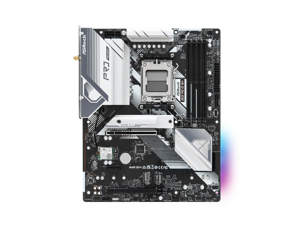
Motherboard: ASRock B650 Pro RS WiFi
The Reliable One
For the motherboard, we chose the ASRock B650 Pro RS WiFi because it gives this build the right balance of features, price and upgradeability. It is a full-size ATX AM5 motherboard, so it fits nicely into our case and gives the system a clean, complete look. It also supports modern Ryzen processors like the Ryzen 7 9800X3D, DDR5 memory, fast NVMe SSDs and built-in WiFi.
We did not want to overspend on an expensive motherboard, because for this VR build the money is better spent on the CPU and GPU. The ASRock B650 Pro RS WiFi gives us the essentials we need for a powerful high-end VR PC without wasting budget on features most users will never use.
RAM: 32GB (2x16) DDR5-6000
The Rampocalypse
We chose 32GB of DDR5-6000 because it is the current sweet spot for a high-end gaming and VR PC. It gives the system enough memory for demanding VR titles, simming, multitasking, recording and everyday creator use, while still keeping the build within budget.
We are using 2x16GB instead of 1x32GB because two sticks allow the system to run in dual-channel mode, which gives the CPU better memory bandwidth and helps overall performance. One single 32GB stick would technically work, but it would leave performance on the table.

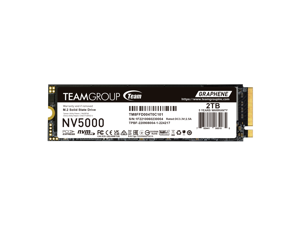
SSD: 2TB PCIe 4.0 NVMe SSD
Space For Sims
We chose a 2TB PCIe 4.0 NVMe SSD because fast storage is essential for a modern high-end VR PC. Games, simulators and VR titles have become huge, so 1TB can feel full very quickly once you install Microsoft Flight Simulator, racing sims, SteamVR titles, mods, recordings and editing files.
The PCIe 4.0 NVMe format gives this build very fast load times, quick file transfers and a much smoother everyday experience compared to older SATA SSDs or hard drives. For simming especially, where large worlds, tracks, aircraft, scenery packs and texture data are constantly loaded, a fast SSD helps the whole system feel more responsive.
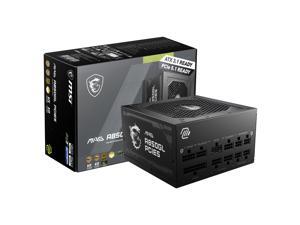
PSU: 850W Gold ATX 3.1 Power Supply
I Need POWER!!!
For the power supply, we chose the MSI MAG A850GL PCIE5 because it gives this build plenty of clean and efficient power without being oversized. With 850W, 80+ Gold efficiency, full modular cables and modern ATX 3.1 / PCIe 5.1 support, it is a great match for the Ryzen 7 9800X3D and RTX 5070 Ti.
It also includes a native 12V-2×6 cable for modern Nvidia graphics cards, so we do not have to rely on messy adapters. Another important reason is its compact 140mm ATX design, which fits well inside our micro-ATX case while still leaving enough room for cable management. Overall, it is powerful, modern, efficient and practical for this high-end VR build.
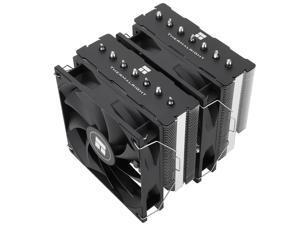
CPU Cooler: Thermalright Phantom Spirit 120
Cool Enough
We chose a strong dual-tower air cooler because the Ryzen 7 9800X3D deserves proper cooling, especially in long gaming, VR and simming sessions. A good CPU cooler helps the processor maintain high performance, keeps temperatures under control and reduces the chance of thermal throttling.
We chose air cooling because it is reliable, effective and cost-efficient. Instead of spending extra money on an expensive liquid cooler, this lets us keep more of the budget focused on the components that directly improve VR performance, especially the CPU and GPU.
For this build, a high-quality air cooler is the smart choice: powerful enough for the 9800X3D, simple to maintain and dependable for years of high-end VR gaming.
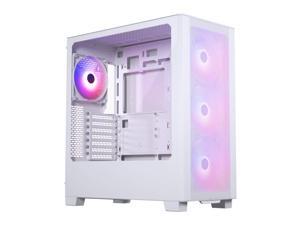
Case: Phanteks XT Pro Ultra
We Don't Do Cute
For the case, we chose the Phanteks XT Pro Ultra because it gives this build excellent airflow, lots of space and great value. It comes with four large 140mm fans pre-installed, which makes it a strong choice for keeping the Ryzen 7 9800X3D and RTX 5070 Ti cool during long VR and flight-sim sessions.
Another big reason is upgradeability. The XT Pro Ultra has enough room for very large graphics cards, so this build is not only ready for today’s RTX 5070 Ti, but also much better prepared for future high-end GPU upgrades. For a powerful VR PC around this price point, it gives us the right mix of cooling, space, looks and value.